
AI Style Transformer for Outfits and Accessories
All tools (30)
The AI style transformer restyles the fashion in a photo. Upload one picture of a person, describe the direction you want, such as new colours, a different pattern or a style era, and the tool updates clothing and accessories while keeping the person, the pose and the composition.
Each generation uses credits, and the generate button shows the cost before you start. Only upload photos of yourself or of adults who have agreed to it.
Drop, paste or click to choose a photo
Needs: 1 photo · PNG, JPEG or WEBP, up to 20 MB
Checking the price…
Content generated on this platform is produced by artificial intelligence models and does not represent the platform's position. [Disclaimer]. [Privacy Policy].
AI Style Transformer Examples
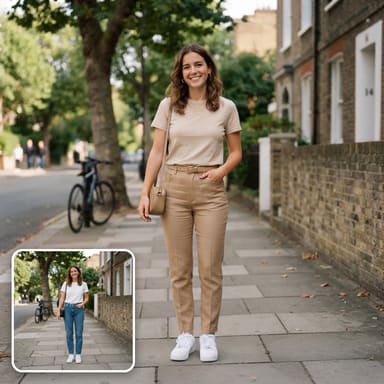
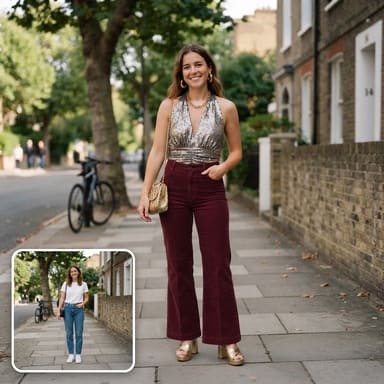
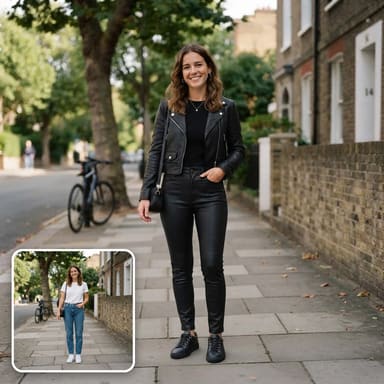
One sample street picture restyled three ways with Nano Banana, the default model. The small frame in each example is the original upload, which is itself AI-generated, so no real person is shown. Each caption quotes the prompt.
Monochrome beige
Prompt: “monochrome beige outfit, gold jewellery, white sneakers”. The white T-shirt and blue jeans become a beige top, dress trousers and a matching bag, while the person, the pose and the street stay the same.
1970s disco
Prompt: “1970s disco look”. Naming an era is enough for a whole outfit: a sequinned halter top, burgundy flared trousers, gold platform shoes and a gold bag.
All black with silver accents
Prompt: “all black with silver accents, leather jacket”. A leather jacket, a black top, coated jeans and black trainers replace the casual look, and the silver shows in the zips and the necklace.
Style Transformer: real results and prompts
We made these on 18 November 2026 with our own test account, using Nano Banana at 1K, the model this page starts with. The sample uploads were made with text-to-image first, and the people in them are AI-generated, not real. Settings and prompts are shown exactly as we used them, and where a result missed part of the prompt or has spelling mistakes, the caption says so. Click “Use this prompt” to put a prompt into the generator above.
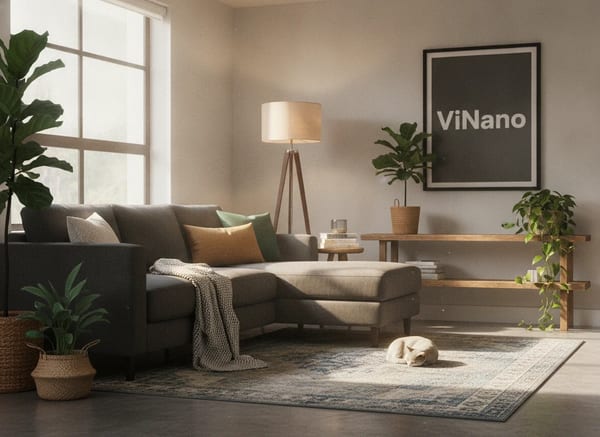
Sample upload
Prompt used to make this sample photo
A realistic photo of a cozy living room with a grey sofa, a reading lamp, plants and a framed poster on the wall that says "ViNano", afternoon sunlight.
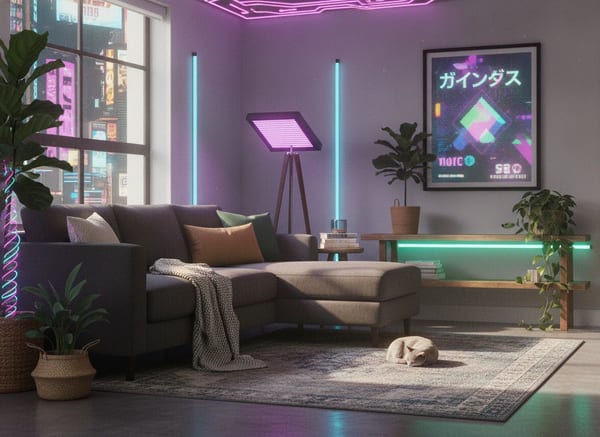
Result
The same room at night with neon strips and city lights outside the window. The poster lost the ViNano name and now shows made-up Japanese text.
Prompt
Cyberpunk style at night with neon lights
How to Use the AI Style Transformer
- 1
Upload one photo in which the outfit is clearly visible. Full-body or three-quarter shots show more of the look than a close-up.
- 2
Describe the style changes in the prompt box: colours, patterns, fabrics, accessories or an era, for example “monochrome beige, gold jewellery, white sneakers” or “1970s disco”. Leave it empty and the tool applies a contemporary, coordinated look.
- 3
Check the credit cost on the button and generate.
- 4
Compare the result with your photo, rerun with a narrower instruction if too much changed, and download.
Tips
- •Change one thing at a time (colour first, then accessories) to see what each instruction does.
- •Say what to keep: “keep the jacket, change only the trousers and the shoes”.
- •Busy backgrounds and crossed arms hide garment edges and make results less clean.
What the AI Style Transformer Changes and Keeps
The instruction behind this tool is a fashion brief. It asks the image model to transform clothing colours with a coordinated palette, update fabric textures and patterns, adjust garment styles while keeping fit and proportions, and refresh the accessories: jewellery, bags and shoes are recoloured or redesigned to match the new look.
It also tells the model what not to touch: the person's natural appearance, the pose and the overall composition. In practice the face, the body shape and the background usually stay close to the original, but the picture is regenerated, so check small details such as hands and hair. Nano Banana is selected by default, and you can pick another model in the tool.
Style Directions to Try
Colour stories are the simplest brief: “all black with silver accents”, “earth tones”, “pastel spring palette”. Pattern and fabric swaps come next: denim to leather, plain to pinstripe, cotton to satin. You can also name an era or a scene, such as 1990s streetwear, a tennis-club look, festival boho or office minimalism, and let the tool coordinate the pieces.
Short, concrete prompts work best. Putting one specific garment from another photo on the person is a different task from restyling; for that, use the AI clothes changer.
Who Uses the Style Transformer
Shoppers preview how an outfit would look in another colour before buying. Creators plan a week of looks from one photo. Small fashion brands mock up colourways for a lookbook, and stylists send clients quick options before a fitting. For any other edit to the same photo, the AI image editor takes plain-language instructions.
Limits and Responsible Use
Results are illustrations of a look, not accurate product images: fabric, logo and fit details are invented by the model, so do not use them to represent a real item for sale without saying so. Do not restyle photos of other people without their consent, do not upload photos of minors, and do not create revealing or sexualised versions of anyone.
AI Style Transformer FAQ
Quick answers to keep your workflow moving.
What does the AI style transformer do?
It regenerates your photo with updated fashion: new clothing colours, patterns, fabrics and matching accessories, while aiming to keep the person, the pose and the composition.
Do I have to write a prompt?
No. Without one, the style transformer applies a contemporary, coordinated update. A short prompt gives you control over colours, accessories or era.
Can it turn my photo into a painting or a cartoon?
That is not what this mode is built for: its instruction is about clothing and accessories. For painted looks, use AI art style transfer.
Will my face change?
The tool is instructed to preserve your natural appearance, and faces usually stay close to the original. Because the image is regenerated, compare it with your photo and rerun if needed.
How much does the AI style transformer cost?
Each generation uses credits based on the model you pick, and the generate button shows the cost before you start. New accounts receive free sign-up credits; the pricing page lists credit packs and plans.
Are my photos stored or shared?
Your upload is used to create the result you ask for and is not shown as an example on this page. Storage, retention and deletion are explained in our Privacy Policy, and the data retention notice with your results shows the current setting for your account.
Need another workflow?
Browse the complete gallery of ViNano AI generation modes to find the perfect fit for your project.