
AI Isometric 3D Illustration Generator
All tools (30)
An AI isometric generator turns a photo into an isometric 3D illustration: the scene is redrawn from the classic isometric angle with parallel lines, soft shadows and a small base around it, in a clean game-art style. Upload one photo of a building, a room, a product or a street, add any details you want, and download the image.
The result is a flat image redrawn by AI, not a 3D model or a measured drawing, and the projection can slip on stairs, roofs and small figures. Each generation uses credits, and the generate button shows the cost before you start.
Drop, paste or click to choose a photo
Needs: 1 photo · PNG, JPEG or WEBP, up to 20 MB
Free accounts can only use Nano Banana. In our test, this mode returned the photo almost unchanged with it; the samples on this page were made with Nano Banana 2.1.
Checking the price…
Content generated on this platform is produced by artificial intelligence models and does not represent the platform's position. [Disclaimer]. [Privacy Policy].
Isometric illustration examples
AI-generated cutaways of an interior, a campus and a retail building, produced with the mode's default settings. The source prompts and model versions were not recorded.
Smart apartment cutaway
A one-bedroom apartment with a removed wall, a holographic floor plan projected on the floor and furnishings in place.
Campus block
An isometric view of a school campus: domed library, sports field, classroom buildings and surrounding streets.
Retail atrium
A multi-storey shopping centre cut open to show escalators, an atrium, shop fronts and shoppers.
Isometric 3D Model: real results and prompts
We made these on 18 November 2026 with our own test account, using Nano Banana 2.1 at 1K. Paid accounts start on Nano Banana 2.1 here. Free accounts use Nano Banana, and with it this mode returned the photo almost unchanged in our test. The sample uploads were made with text-to-image first, and the people in them are AI-generated, not real. Settings and prompts are shown exactly as we used them. Click “Use this prompt” to put a prompt into the generator above.
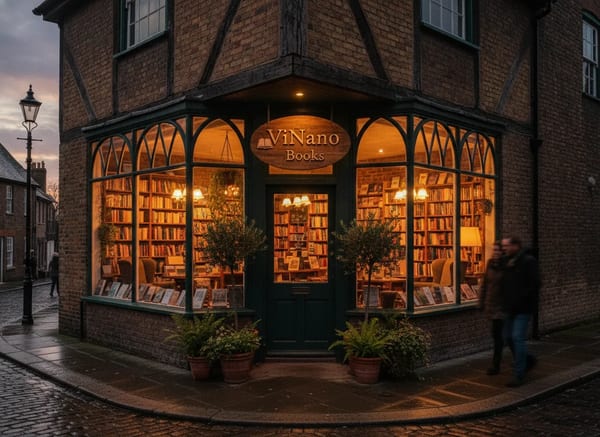
Sample upload
Prompt used to make this sample photo
A realistic photo of a small corner bookshop with large windows, potted plants by the door and a wooden sign above that reads "ViNano Books", early evening with warm interior lights.
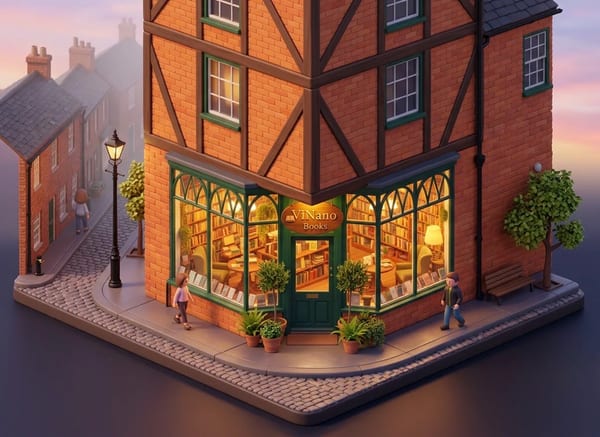
Result
Without a prompt, the street corner becomes an isometric 3D model on a small base, with the lit windows, the street lamp and the ViNano Books sign kept.
Prompt
No extra prompt (the mode's default instructions)
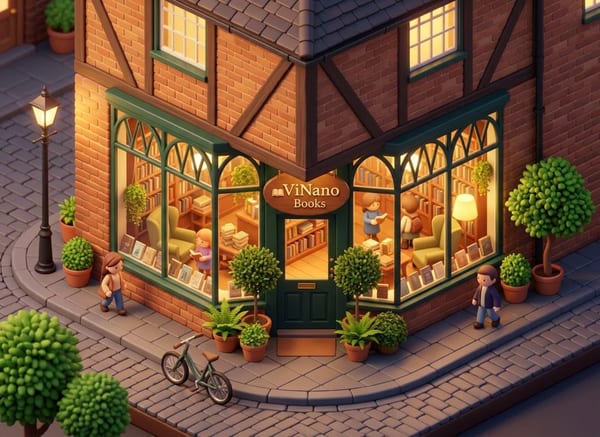
Result
The prompt adds tiny people inside and outside the shop and a bicycle by the kerb, while the brick, the timber beams and the ViNano Books sign stay.
Prompt
Add tiny people browsing books and a bicycle parked outside
How to build an isometric illustration
- 1
Upload one photo of the scene, such as a single room, a whole building, a campus or a city block, and say in the prompt how much of it should appear.
- 2
Choose the cutaway: full interior in view, one wall removed, or an open roof.
- 3
Add materials, palette and lighting, and ask for a plain background so the modelled volume reads clearly.
- 4
Generate the image, then check the geometry: AI isometric art often breaks the projection on stairs, floors and roofs.
- 5
Use the result as a concept or illustration, and rebuild measured geometry in a CAD or 3D tool when the project needs it.
Tips
- •Name the scene type (apartment, campus, factory floor or retail unit) and how much of the interior should be visible
- •Fix the camera in the prompt: isometric angle, light direction and ground plane
- •Describe what sits inside the walls so the cutaway stays readable
From Photo to Isometric 3D Illustration
The tool asks the image model to convert your photo to isometric projection, with parallel lines kept parallel and consistent scale, and to render it in a cute, toy-like style: rounded shapes, saturated colours, soft shadows and small details such as trees and paths around the base. The look is close to isometric game art and friendly architectural visualisation. Nano Banana is selected by default, and you can pick another model in the tool.
Your prompt is added to those instructions. Use it to keep or add features, or to change the style, for example "realistic materials, muted colours, no extra trees".
Isometric angle
The view sits at the classic isometric angle with parallel edges, so several images line up as a set.
Game-art look by default
Rounded shapes, bright colours and soft shadows give the miniature style used in mobile and casual games.
Keeps the main features
Towers, windows, roof shapes and signs from your photo are carried into the new view.
A small base around it
Paths, trees or street details make the subject read as a diorama. Ask for a plain background to drop them.
Isometric Prompt Ideas
Upload a photo first, then add one of these lines. They are added to the tool's built-in isometric instructions.
Café diorama
Turn this café into an isometric diorama with outdoor tables, a striped awning, warm evening light and a cobblestone base tile.
Room cutaway
Show this room as an isometric cutaway with two walls removed, keep the desk, shelves and plants, pastel colours, soft shadows.
Product on a tile
Render this product as an isometric 3D object on a square tile, plain white background, no trees or paths, studio lighting.
Campus map tile
Turn this campus photo into an isometric map tile with green lawns, paths and trees, flat infographic style, no text.
What You Can Make with an AI Isometric Generator
To animate the scene with a slow camera move, send the image to the AI video generator. For a breakdown of a product's parts instead of a whole scene, use the exploded view generator.
Game and app art
Concept tiles for city builders, level maps and in-app illustrations.
Architecture and property
A friendly overview of a building, café or flat for a brochure or a listing.
Infographics and slides
Isometric objects that sit together cleanly in a diagram or a report.
Social posts
A miniature version of your house, office or favourite place.
Isometric Art vs Isometric Technical Drawing
In technical drawing, an isometric view is constructed from the front, top and side views of a part, with exact measurements along three axes. This tool does not read orthographic views or dimensions. It redraws a photo in an isometric style, which suits illustration and inspiration but not graded exercises, workshop plans or 3D printing.
For exact isometric views, model the part in a CAD program and export the view from there.
Isometric illustration questions
Quick answers to keep your workflow moving.
Is the output a 3D model?
No. It is a flat image: you cannot rotate it, and it contains no geometry, layers or measurements.
Can I measure rooms or buildings from the image?
No. Proportions are illustrative and should not be treated as scale drawings or used for construction.
Can I get the same scene from another angle?
Not by rotating the file. Describe the new viewpoint in a fresh prompt, or ask for the same scene in a different isometric orientation.
What image size can I get?
Available sizes depend on the selected model and the settings offered in the tool; higher-resolution output can cost more credits.
The people and cars came out distorted. What can I do?
Ask for fewer figures, or for none at all, and add them in an image editor afterwards: small elements are where isometric renders break down first.
Is the AI isometric generator free?
It is free to try. New accounts receive free sign-up credits, 50 for most email providers. With Nano Banana, the default model, one image costs 25 credits on a free account, so the sign-up credits cover two. Models such as Nano Banana Pro need a paid account, and the generate button shows the cost before you start.
What is the best AI isometric art generator?
It depends on what you start from. With a photo of the place or object, this tool is built for the job: the isometric angle, lighting and style are already in its instructions, so a short prompt is enough. To start from words only, describe the scene in the AI image generator and ask for an isometric view. For exact, measured views, use CAD software rather than an image model.
Can it build an isometric view from front, top and side views?
Not reliably. It treats the upload as a picture to restyle and does not reconstruct a part from orthographic views or keep dimensions, so the result can differ from the real part. Use CAD software for technical drawing exercises.
Need another workflow?
Browse the complete gallery of ViNano AI generation modes to find the perfect fit for your project.