
AI Game UI Design Generator
All tools (30)
An AI game UI generator turns a short brief into a mockup of a game screen, such as a HUD, main menu, inventory, shop or settings panel. Describe the genre, platform and screen, or upload screenshots or concept art to set the style, and download a full interface mockup to use as a design reference.
Mockups are flat images with no layers, and AI lettering is often garbled, so rebuild the screen in your UI tool before it goes into a game. Each generation uses credits, and the generate button shows the cost before you start.
Drop, paste or click to choose a photo
Optional, up to 1 photo · PNG, JPEG or WEBP, up to 20 MB
Checking the price…
Content generated on this platform is produced by artificial intelligence models and does not represent the platform's position. [Disclaimer]. [Privacy Policy].
Game interface examples
AI-generated interface mockups produced with the mode's default settings. They are visual references; the source briefs and model versions were not recorded.
Strategy battle screen
A tactical battle view with a hex map, unit markers, a resource sidebar and a bottom bar for skills and unit counts.
Fighting game HUD
Two fighter portraits, mirrored health bars, a round timer and an on-screen move prompt.
Farming game shop
A seed shop panel with crop cards and prices, a tool upgrade column, a weather widget and a farm income summary.
Game UI Creation: real results and prompts
We made these on 18 November 2026 with our own test account, using Nano Banana at 1K, the model this page starts with. We tried several prompts for this mode and show the better results; where a result has spelling mistakes, added something or missed part of the prompt, the caption says so. Click “Use this prompt” to put a prompt into the generator above.
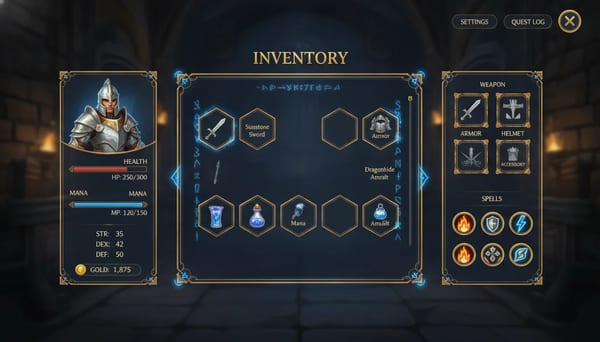
An inventory screen with item slots, character stats and a gold counter. The game's name from the prompt doesn't appear on screen.
Prompt
Inventory screen for a fantasy RPG called ViNano Quest, with item slots, a gold counter and character stats
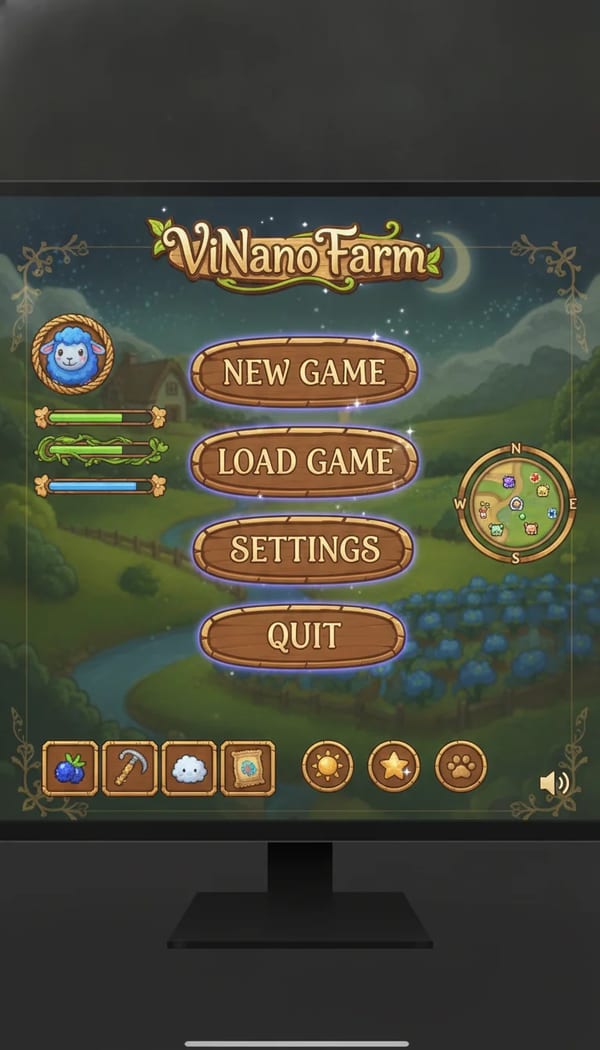
A cute farming-game menu with the ViNano Farm title, drawn on a monitor rather than as a flat screen.
Prompt
Main menu for a cute farming game titled ViNano Farm
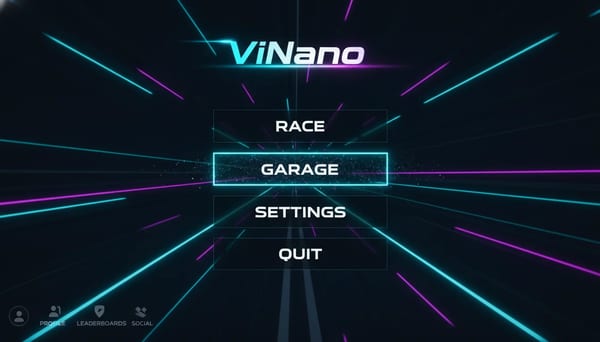
The racing theme and the ViNano title from the prompt are kept, but the model drew the main menu (Race, Garage, Settings, Quit) instead of the in-race HUD with a speedometer, lap counter and minimap.
Prompt
Racing game HUD with a speedometer, lap counter and minimap, and a trackside banner that reads ViNano
How to design a game interface with AI
- 1
Describe the game: genre, platform, target resolution and the screen you want to start with.
- 2
List the interface elements that must appear (health bar, minimap, buttons, counters, currency) and where each one sits.
- 3
Add the visual direction: palette, type style, icon shapes and how frames and panels should be treated.
- 4
Generate the mockup, then check that the text is legible and that controls sit where players expect them.
- 5
Take the mockup into your UI tool and rebuild the layout: the image is a reference, not a production asset with editable layers.
Tips
- •List the screens you need: HUD, main menu, shop, inventory, settings
- •Name the platform and the aspect ratio: a mobile HUD and a desktop HUD need different layouts
- •Reuse the same palette, typography and icon description across prompts so a set of screens stays consistent
What the AI Game UI Generator Draws
With an empty prompt and no image, the tool draws a fantasy RPG interface: a main menu with New Game, Load Game, Settings and Quit, a character HUD with health and mana bars, a minimap, inventory slots and skill icons, in a medieval style with gold accents. Nano Banana is selected by default, and you can pick another model in the tool.
Your prompt is added to the tool's UI instructions, so you can swap in your own game: genre, platform, screen and art direction. Upload up to five images, such as a screenshot, concept art or a style board, and the interface follows their look and theme.
Whole screens, not single buttons
HUD, menus, inventory, shop and settings come out as one composed screen, so you see the hierarchy at a glance.
Any genre
Fantasy RPG by default. Ask for a sci-fi shooter HUD, a cosy farming shop or a mobile puzzle menu instead.
Style from your art
Reference images carry your colours, frame shapes and mood into the interface.
Quick variations
Generate several layouts for the same brief and compare them before you open your design tool.
Game UI Prompt Examples
These work with or without an uploaded image. Each prompt is added to the tool's built-in UI design instructions.
Sci-fi shooter HUD
First-person sci-fi shooter HUD for PC: ammo counter bottom right, shield and health bars bottom left, compass at the top, neon cyan on dark glass panels.
Mobile puzzle menu
Portrait mobile main menu for a casual puzzle game: a big Play button, level map preview, daily reward chest, coin and life counters at the top, candy colours, rounded buttons.
Farming game shop
Cosy farming game shop screen with seed cards and prices, a basket total and a sell tab, hand-drawn wooden frames, warm pastel colours.
Racing results screen
Racing game results screen with podium positions, a lap time table, reward coins and a Next Race button, bold italic type, red and black theme.
Who Uses AI Game UI Mockups
To create character or item art for the interface, use the AI image generator. For an isometric scene to go with your menus, try the isometric 3D illustration generator.
Indie developers
Get a visual direction for the HUD and menus before hiring an artist or building screens in the engine.
Game jams and prototypes
Make a believable interface quickly for a pitch, a trailer frame or a store page.
UI designers
Explore layouts and styles for a mood board, then rebuild the chosen direction in Figma.
Students and portfolios
Practise game UI design by reworking a screen and comparing variations.
Game UI Mockup vs Production UI
Production game UI is built from separate sprites, nine-slice frames, fonts and a layout system in Unity, Unreal, Godot or Figma, so it scales to every screen and can be translated. The generator gives you one flat picture of a screen.
Treat it as a concept sketch: decide what works, then rebuild the layout with real assets, real text and your own icons.
Game UI questions
Quick answers to keep your workflow moving.
Can I use the output directly in Unity, Godot or Figma?
Not directly. You receive a flat image without layer separation, slices or nine-patch data, so it works as a visual reference that you rebuild in your own tool.
Is the generated text and numbering usable?
Sometimes, but AI lettering is often garbled. Check every label and replace it with real copy once you rebuild the screen.
How do I keep several screens visually consistent?
Reuse the same style description, palette and icon wording in every prompt, and generate the screens in one sitting so the wording stays identical.
What resolution should I ask for?
Match the target device. Available resolutions depend on the selected model and the settings offered in the tool, and larger outputs can cost more credits.
The layout is unusable. How do I fix it?
Rerun with an explicit arrangement, for example "health bar top-left, minimap bottom-right", or generate two or three variants and pick the closest one.
Is the AI game UI generator free?
It is free to try. New accounts receive free sign-up credits, 50 for most email providers. With Nano Banana, the default model, one image costs 25 credits on a free account, so the sign-up credits cover two. Models such as Nano Banana Pro need a paid account, and the generate button shows the cost before you start.
Do I need to upload an image?
No. A text brief is enough, and with no prompt at all you get the default fantasy RPG interface. Upload up to five images when you want the screen to match an existing art style.
Need another workflow?
Browse the complete gallery of ViNano AI generation modes to find the perfect fit for your project.