
AI Art Style Transfer for Your Photos
All tools (30)
AI art style transfer redraws your photo in the manner of a classic art movement. Upload one picture, choose Impressionist, Cubist, Abstract, Renaissance, Pop Art or Watercolor, add optional notes on colour or technique, and download a version that keeps your subject but looks painted.
Each generation uses credits, and the generate button shows the cost before you start. The result is a new AI-generated image in a historical style, not a copy of any specific artwork. Only upload photos you have the right to edit.
Drop, paste or click to choose a photo
Needs: 1 photo · PNG, JPEG or WEBP, up to 20 MB
Free accounts can only use Nano Banana. In our test, this mode returned the photo almost unchanged with it; the samples on this page were made with Nano Banana 2.1.
Checking the price…
Content generated on this platform is produced by artificial intelligence models and does not represent the platform's position. [Disclaimer]. [Privacy Policy].
AI Art Style Transfer Examples
Three directions a picture can take: thick swirling paint, a brush-and-ink landscape, and flat pop-art colour.
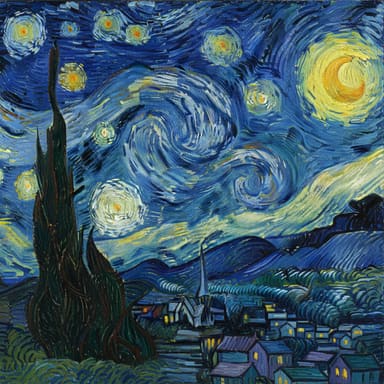
Swirling night sky
A village under a night sky, redrawn with thick, swirling strokes in deep blue and yellow.
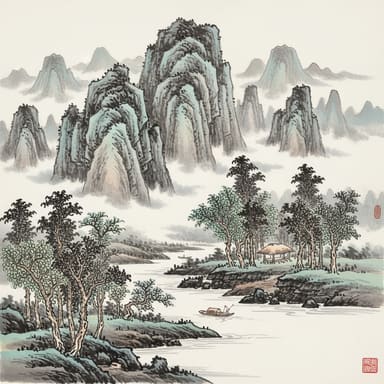
Ink-wash mountains
Misty peaks, pines and a river in a brush-and-ink landscape with soft colour washes.
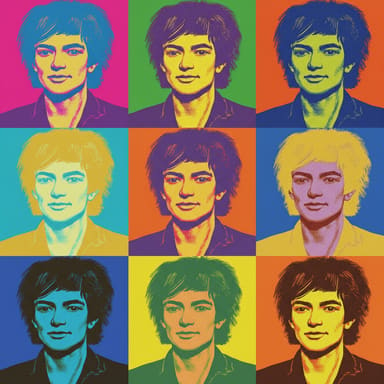
Pop-art portrait grid
One portrait repeated nine times in clashing flat colours, the look of the Pop Art option.
Artistic Style Transfer: real results and prompts
We made these on 18 November 2026 with our own test account, using Nano Banana 2.1 at 1K. Paid accounts start on Nano Banana 2.1 here. Free accounts use Nano Banana, and with it this mode returned the photo almost unchanged in our test. The sample uploads were made with text-to-image first, and the people in them are AI-generated, not real. Settings and prompts are shown exactly as we used them. Click “Use this prompt” to put a prompt into the generator above.
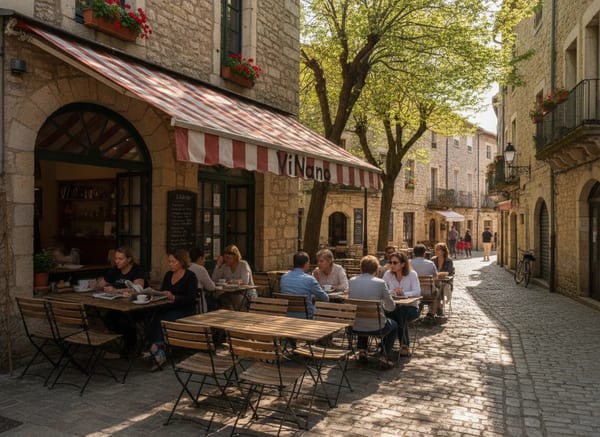
Sample upload
Prompt used to make this sample photo
A street café in an old European town on a sunny afternoon, wooden tables outside and a striped awning with the name "ViNano" painted on it, realistic photo.
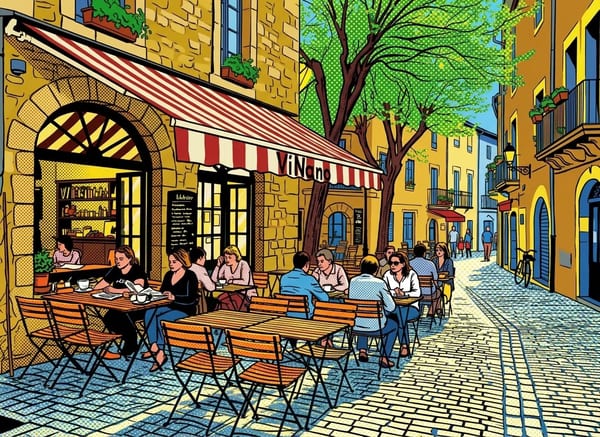
Result
Pop Art turns the street into a comic-style print with thick outlines, flat bright colors and halftone dots, and the ViNano awning stays readable. With the Impressionist style, both Nano Banana and Nano Banana 2.1 returned the photo almost unchanged, so we don't show it.
Setting: Art Style: Pop Art
Prompt
No extra prompt (the mode's default instructions)
How to Use AI Art Style Transfer
- 1
Upload one photo. Landscapes, portraits, pets and still lifes all work; strong shapes and clear light survive the restyle best.
- 2
Choose an “Art Style”: Impressionist, Cubist, Abstract, Renaissance, Pop Art or Watercolor. Impressionist is selected by default.
- 3
Optionally describe techniques, colours or composition in the prompt box, for example “thick palette-knife strokes, warm sunset palette”.
- 4
Check the credit cost on the button, generate, compare the result with your photo, and download it.
Tips
- •Run the same photo through two or three styles before deciding; subjects that fail in Cubist often shine in Watercolor.
- •Say what must stay recognisable, such as a face or a building, because abstract styles deliberately break shapes apart.
- •For prints, start from the largest photo you have and choose a model and size that offer enough resolution.
Six Art Styles You Can Transfer to a Photo
Impressionist breaks the scene into visible dabs of colour and soft edges, and suits gardens, water and street scenes. Watercolor thins everything into transparent washes with paper showing through, a good match for flowers, travel photos and children's portraits. Renaissance pushes toward balanced composition, modelled light and deep, muted colour, which flatters formal portraits.
Cubist rebuilds the subject from overlapping planes seen from several angles, and Abstract loosens it further into shape and colour, so these two change a photo the most. Pop Art flattens the picture into bold outlines and saturated blocks of colour, the natural choice for posters and profile pictures.
How AI Art Style Transfer Works Here
The tool sends your photo and a detailed instruction for the chosen movement to an image model. Nano Banana is selected by default, and you can pick another model in the tool. The instruction asks the model to keep the original subject while adopting the brushwork, palette, texture and composition habits of the style.
This is generative style transfer: the model repaints the picture instead of laying a filter over the pixels. That gives real-looking brushstrokes, and it also means small details such as fingers, lettering or a pattern on clothing can change. Compare the result with your photo and rerun if something important moved.
Tips to Turn a Photo into a Painting You Can Print
Crop before you upload so that the subject fills the frame; empty space becomes empty canvas. Use the prompt box for the choices a painter would make: palette, time of day, how loose the strokes are, what the background should become. One or two instructions work better than a long list.
A short note can pull a style further, for example toward ink wash or woodblock print. For looks far outside the six options, such as pixel art, open the AI image editor and describe the style in your own words. To animate a finished painting with a slow camera move, upload it to the AI video generator.
Style, Copyright and Honest Use
Art movements are not owned by anyone, which is why the options are movements and not living artists. The output is new, AI-generated work: do not sell or present it as an original by a named painter, and do not upload artwork or photos you have no right to edit. If you print or publish results commercially, check the rules that apply where you live.
AI Art Style Transfer FAQ
Quick answers to keep your workflow moving.
What is AI art style transfer?
It is a way to redraw a photo in the visual language of an art movement while keeping the subject. Here you pick one of six styles, and an image model repaints the photo with matching brushwork, colour and composition.
Which art styles are available?
Impressionist, Cubist, Abstract, Renaissance, Pop Art and Watercolor. You can steer each one further with a short note in the prompt box.
Will my face or subject stay recognisable?
Usually in Impressionist, Renaissance, Watercolor and Pop Art. Cubist and Abstract break forms apart by design. Say what must stay recognisable in the prompt box and rerun if needed.
Can it change my outfit instead of the art style?
No. This mode redraws the whole picture in the art style you choose. To keep the photo realistic and change only the clothes, colors or accessories, use the Style Transformer.
How much does AI art style transfer cost?
Each generation uses credits based on the model you pick, and the generate button shows the cost before you start. New accounts receive free sign-up credits; the pricing page lists credit packs and plans.
Can I use the painted result commercially?
The image is generated for you from your own photo, and you are responsible for how you use it. Make sure you hold the rights to the source photo, and do not market the result as the work of a real artist.
Are my photos stored or shared?
Your upload is used to create the result you ask for and is not shown as an example on this page. Storage, retention and deletion are explained in our Privacy Policy, and the data retention notice with your results shows the current setting for your account.
Need another workflow?
Browse the complete gallery of ViNano AI generation modes to find the perfect fit for your project.