
AI Animal Info Card Maker
All tools (30)
The animal info card maker creates an illustrated fact card from an animal's name. Type the species you want, or leave the choice to chance, and get a card with a picture, common and scientific names, habitat, diet, size and conservation status, laid out for classrooms and nature projects.
The facts on each animal info card are written by an AI model and can be wrong or misspelled. Check them against a trusted source before you teach from a card or publish it. Each generation uses credits, and the generate button shows the cost before you start.
This tool works from text. Fill in the description, or leave it empty and let AI pick a theme.
Checking the price…
Content generated on this platform is produced by artificial intelligence models and does not represent the platform's position. [Disclaimer]. [Privacy Policy].
Animal Info Card Examples
Three cards made by adding one line to the pre-filled prompt: “Animal: [name]. English only, square 1:1 layout, large readable text, no logos, brand names or web addresses.” Each caption names the model. In our test runs, cards from the default Nano Banana model and most cards from Nano Banana 2.1 had misspelled or garbled words, while the two Nano Banana Pro cards came out nearly clean on the first try. Nano Banana 2.1 and Nano Banana Pro need a paid account, and the facts on every card still need checking.
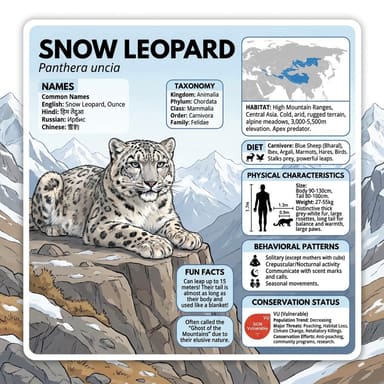
Snow leopard card
Made with Nano Banana Pro. A field-guide layout with names, taxonomy, a range map, diet, a size comparison, behaviour and conservation status. Two things to notice: the red badge reads “UCN” instead of “IUCN”, and the card lists the name in Hindi, Russian and Chinese although the prompt asked for English only.
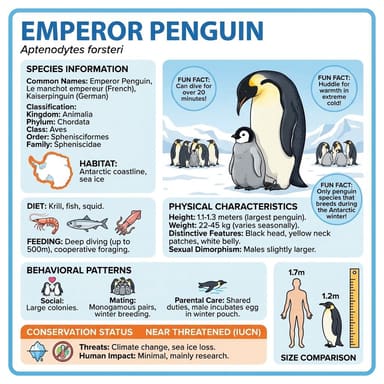
Emperor penguin card
Made with Nano Banana Pro. A blue classroom card with classification, an Antarctica habitat map, diet icons, three fun facts and a size comparison with a 1.7 m person. We found no misspelled words on this one.
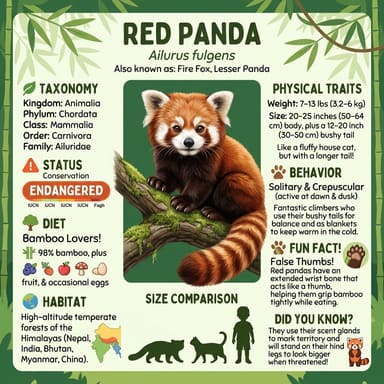
Red panda card
Made with Nano Banana 2.1. A bamboo-green card with taxonomy, weight and size, diet, a Himalaya habitat map and a size comparison with a cat and a child. The main text is clean; the tiny scale under the status badge ends in a nonsense word.
Animal Info Card: real results and prompts
We made these on 18 November 2026 with our own test account, using Nano Banana at 1K, the model this page starts with. We tried several prompts for this mode and show the better results; where a result has spelling mistakes, added something or missed part of the prompt, the caption says so. Click “Use this prompt” to put a prompt into the generator above.
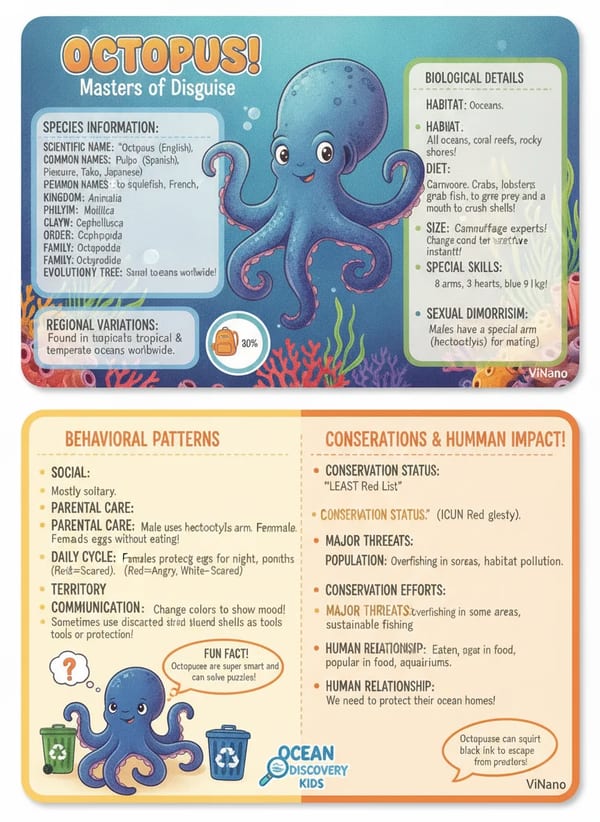
A two-sided card for kids with species facts, behavior and conservation. Some small text has mistakes ("HUMMAN IMPACT") or is garbled, so check it before you print.
Prompt
Octopus, with the small text ViNano in the footer
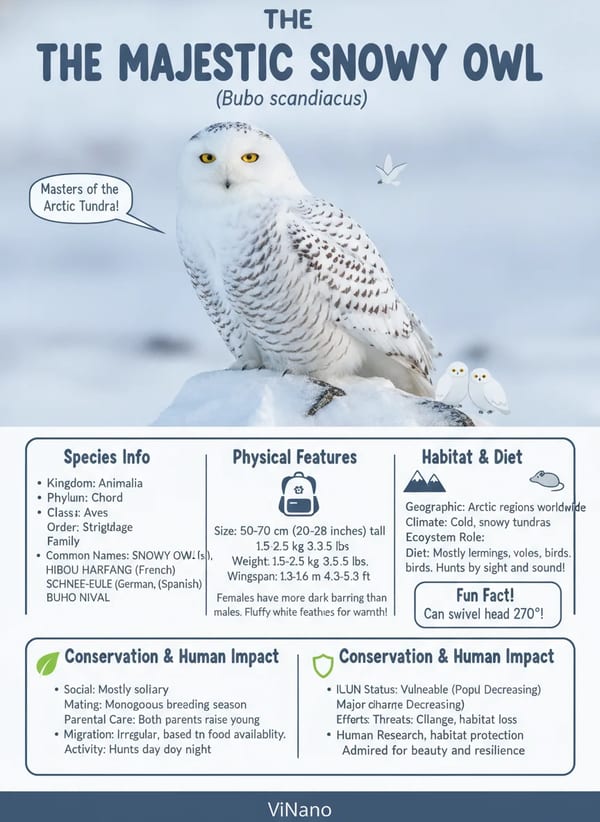
A cleaner layout with a large owl picture and fact boxes, but the title repeats a word ("THE THE MAJESTIC SNOWY OWL").
Prompt
Snowy owl, with the small text ViNano in the footer
How to Make an Animal Info Card
- 1
Open the prompt box. It is pre-filled with a brief for an educational card, and no image upload is needed.
- 2
Add the animal's name to the prompt, for example “Animal: snow leopard”, and any focus you want, such as “for ages 6 to 8” or “emphasise diet and habitat”. If no animal is named, the tool picks a wild animal at random.
- 3
Check the credit cost on the button and generate.
- 4
Read the card, verify the facts and the spelling, rerun if something is wrong, and download.
Tips
- •Use the precise species (“African bush elephant”, not just “elephant”) for more specific facts.
- •Ask for fewer fields if the text is too small: “name, habitat, diet and one fun fact only”.
- •State the style: realistic photo, watercolor, cartoon or vintage field guide.
What Goes on an AI Animal Info Card
The brief asks the image model for an educational card with the animal's common and scientific names, habitat and range, diet, physical characteristics such as size and weight, conservation status and a few interesting facts. It also asks for visual aids, such as a habitat map, a size comparison and small icons, in a clean layout with readable type. Nano Banana is selected by default, and you can pick another model in the tool. For cards with a lot of small text, Nano Banana Pro gave the cleanest spelling in our test runs. It needs a paid account and costs more credits per image.
You can narrow or widen that list in the prompt. A card for a five-year-old might carry only a name, a home and a favourite food; a card for a biology class can add classification and lifespan.
Animal Fact Cards for Classrooms and Families
Teachers print sets of animal fact cards for habitat units, matching games and wall displays. Parents make a card for the animal a child is obsessed with this week. Zoos, nature clubs and youth groups use cards as trail prompts or quiz prizes, and writers use them as quick reference sheets for a creature in a story.
For a consistent set, reuse the same style sentence in every run, such as “flat vector style, teal border, same layout”, and change only the animal's name. The cards also work as animal flashcards: ask for the picture and the name on one card and the facts on another.
Accuracy: Verify Every Animal Info Card Before You Print
An image model is not a reference book. It can swap two numbers, give an outdated conservation status or misspell a scientific name, and small text is where errors hide. Compare each card with a trusted source. The IUCN Red List is the standard reference for conservation status, and a museum, zoo or encyclopedia page will confirm size, diet and range.
If a fact is wrong, give the correct value in the prompt (“weight: 22 to 55 kg”) and rerun, or fix the text area with AI image inpainting.
Other Subjects and Layouts
The mode is built for animals, including dinosaurs, insects and sea life. For plants, planets or imaginary creatures, write your own card brief in the free AI image generator, and adjust a finished card in the AI image editor.
Animal Info Card FAQ
Quick answers to keep your workflow moving.
How do I make an animal info card?
Add an animal's name to the pre-filled prompt and generate. An image model draws the animal and lays out its facts on one card.
Do I need to upload a photo of the animal?
No. This mode works from text alone; the picture is generated.
Are the facts on the card accurate?
Often, but not reliably. Numbers, statuses and spellings can be wrong. Verify every card before you use it for teaching.
Can I choose the style and the reading level?
Yes. Add notes such as “cartoon style for preschool” or “field-guide style for grade 6” to the prompt.
How much does the animal info card maker cost?
Each generation uses credits based on the model you pick, and the generate button shows the cost before you start. New accounts receive free sign-up credits; the pricing page lists credit packs and plans.
Can I print the cards?
Yes, as image files. Check that small text is legible at the size you plan to print, and choose a model and size with enough resolution.
Need another workflow?
Browse the complete gallery of ViNano AI generation modes to find the perfect fit for your project.