

Seedance 2.0 Pro AI動画生成ツール
すべての動画モデル(15)
Seedance 2 は無料で使える?答えはいいえです。ViNano AI で Seedance 2.0 を使うには、有料アカウント(クレジットパックまたはサブスクリプションプランを購入)とクレジットが必要です。最も短い動画(480p で5秒)は 180 クレジットかかります。無料アカウントでは、代わりに Seedance 1.0 Pro を使えます。
Seedance 2.0 Pro 音声付き動画
動画を生成するには、まずログインしてください
本プラットフォームで生成されるコンテンツは人工知能モデルによって生成され、プラットフォームの立場を代表するものではありません。 [免責事項]。 [プライバシーポリシー]。
3ステップで Seedance 2.0 を始める方法
- ViNano AI のアカウントを登録します。Gmail や Outlook などの一般的なメールで登録すると 50 クレジット、それ以外のメールドメインでは 20 クレジットが登録特典としてもらえます。無料アカウントのクレジットは Seedance 1.0 Pro で使え、最も短い動画は 90 クレジットかかるため、先にクレジットを追加する必要があるかもしれません。
- 料金ページでクレジットパックまたはサブスクリプションプランを購入します。購入するとアカウントで Seedance 2.0 が使えるようになり、クレジットが残高に追加されます。Seedance 2.0 の最も短い動画には 180 クレジットが必要です。
- 480p と5秒を選び、プロンプトを書くか参照ファイルを追加して生成します。開始前に生成ボタンに正確なクレジットが表示され、完成した動画は生成画面の下の履歴に表示されます。
Seedance 2.0 は無料?必要なクレジット
Seedance 2.0 の動画は、長さと解像度に応じてクレジットを消費します。この表は生成画面と同じ設定から作っているので、実際に差し引かれるクレジットと一致します。
| 解像度 | モデル | 5秒 | 10秒 | 15秒 |
|---|---|---|---|---|
| 480p | Seedance 2.0 Fast | 180 クレジット | 360 クレジット | 540 クレジット |
| 720p | Seedance 2.0 Fast | 400 クレジット | 800 クレジット | 1200 クレジット |
| 1080p | Seedance 2.0 | 1600 クレジット | 3200 クレジット | 4800 クレジット |
Seedance 2.0 は有料アカウント、つまりクレジットパックを購入したか、有効なサブスクリプションプランがあるアカウントだけが使えます。無料アカウントはクレジットが足りていても Seedance 2.0 の動画を生成できませんが、Seedance 1.0 Pro は使えます。
一度購入したアカウントなら、登録特典や毎日のチェックイン報酬のクレジットも Seedance 2.0 に使えます。また有料アカウントは、無料アカウントに表示される広告のカウントダウンなしで、すぐに動画をダウンロードできます。
Seedance 2.0 とは?
Seedance 2.0 は ByteDance Seed の動画生成モデルです。公式のモデルページでは、音声と映像を同時に生成し、テキスト、画像、音声、動画を入力として受け付ける単一のアーキテクチャと説明されています。
ViNano AI の Seedance 2.0 Pro では、480p / 720p / 1080p で5 / 10 / 15秒の動画を、同期した音声付きで作れます。プロンプトだけで生成することも、最大 12 個の参照ファイル(画像最大 9 枚、動画 3 本、音声 3 本)を追加し、プロンプト内で @ を使って指定することもできます。例:「@1 の動きをなぞる」。
Seedance 2.0・Seedance 1.0 Pro・Seedance 2.5 の比較
3つの Seedance バージョンは、すべて同じ生成画面で使えます。表では、ViNano AI でそれぞれが提供する内容を比べています。
| バージョン | 動画の長さ | 解像度 | 音声 | 最低料金 |
|---|---|---|---|---|
| Seedance 1.0 Pro | 5 / 10秒 | 480p, 720p, 1080p | なし | 90 クレジットから |
| Seedance 2.0 Pro | 5 / 10 / 15秒 | 480p, 720p, 1080p | あり | 180 クレジットから |
| Seedance 2.5 | 5 / 10 / 15秒 | 480p, 720p, 1080p | あり | 390 クレジットから |
Seedance 1.0 Pro は、音声なしの動画でアイデアを試す最も低コストな方法で、3つのうち無料アカウントで使える唯一のバージョンです。Seedance 2.5 も音声と参照の組み合わせに対応し、1本あたりのクレジットはより多くかかりますが、既存の動画を再編集できます。出力を並べた比較は Seedance 1.0・1.5・2.0 の比較をご覧ください。
Seedance 2.0 のクレジットを有効に使うコツ
- 新しいプロンプトは、最も低コストな5秒・480p で試してから、長いバージョンや高解像度のバージョンを生成しましょう。
- 主な被写体を1つに絞り、何をするのか、どこで起きるのか、カメラがどう動くのかを書きましょう。例:「雨の夜の通りを自転車で走る人、トラッキングショット」。
- 登場人物は少なめにしましょう。人が多いシーンは、フレーム間で一貫性を保つのが難しくなります。
- 鮮明で明るい参照ファイルを使い、それぞれを @ で指定して、どのファイルのことかをモデルに伝えましょう。
- 動きがよくなったら、720p や 1080p、または長い尺で生成し直しましょう。
各設定の詳しい説明は Seedance シリーズガイドを、商品動画での2つのモデルの比較は EC 動画での Veo 3.1 と Seedance の比較をご覧ください。
ViNano で Seedance 2.0 Pro を使って作った動画
2026年11月18日に ViNano で Seedance 2.0 Pro を使い、720p で作った5秒の動画2本です。それぞれ1回の生成で、音声付き、あとから編集はしていません。3本目としてパン屋のシーンも作りましたが、黒板に書かれた ViNano のつづりが間違っていたため、載せていません。プロンプトを開くと実際に入力した文面が見られ、上の生成欄にそのまま入れることもできます。
夕暮れの屋上で踊るダンサー
Seedance 2.0 Pro · 720p · 5秒 · 音声付き
回転に合わせて赤いドレスがひるがえり、そのあとカメラが引いて、夕暮れの街並みと手すりに掛かったオレンジ色の ViNano の横断幕が映ります。プロンプトでは被写体の周りを回るカメラを指定しましたが、モデルは代わりにゆっくり引くカメラワークにしました。
プロンプトを見る
A dancer in a flowing red dress spins on a rooftop at sunset, the city skyline glowing behind her. An orange banner printed with "ViNano" flutters in the wind on the railing. Smooth orbiting camera, soft music.
白い断崖の沖を走るヨット
Seedance 2.0 Pro · 720p · 5秒 · 音声付き
ターコイズ色の海の上を飛ぶ空撮で、ヨットに近づいていきます。最後には帆の ViNano の名前が読めるようになります。
プロンプトを見る
Aerial drone shot over a turquoise sea and white cliffs, slowly approaching a sailboat whose white sail is printed with "ViNano". Bright sunlight, the sound of wind and waves.
厳選ケーススタディ
ViNano AI で参照画像を生成・編集し、Veo 3.1 や Seedance などのモデルでショート動画に仕上げます。


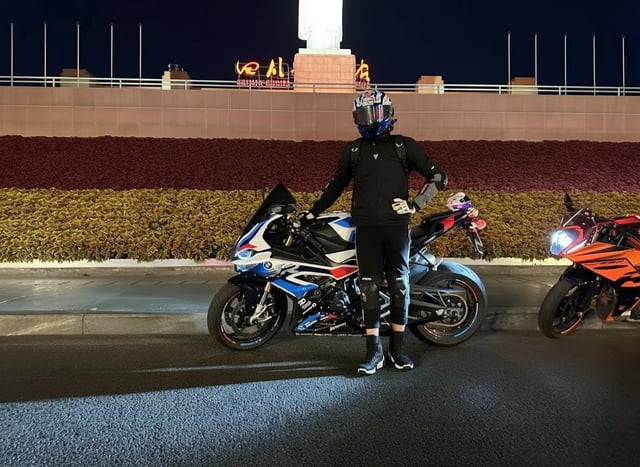
クールな車両ポーズ
普段の車両写真をスタイリッシュなライダーカットに編集し、雨の中を疾走する動画に仕上げます。
ステッププロセス
クールポーズ画像生成のプロンプト例
"Change the person in the photo to get out of the car, stand next to the car, and pose in a cool way"
雨中バイク疾走動画生成のプロンプト例
"Use the motorcycle and rider in the picture to generate a photo of riding fast in the rain. In the lens, you can see raindrops falling, passing through a puddle, splashing a little water towards the lens, and then the lens immediately switches to capture the back of the motorcycle."
...クリックしてプロンプト全文を表示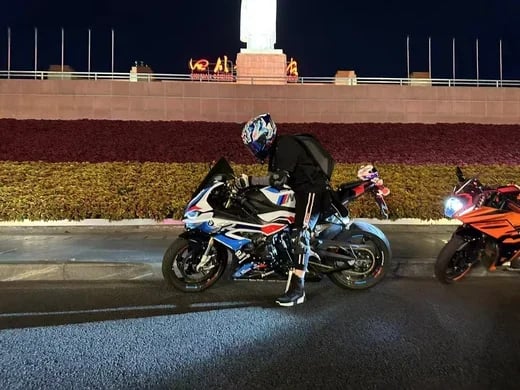


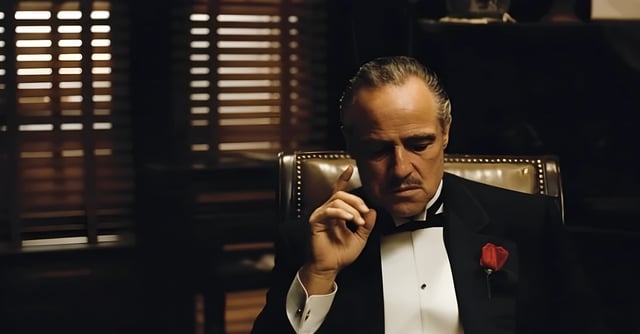
SF戦士変身
スーツ姿の人物からSFアーマー姿へと変化する、エフェクト付きの変身シーンを生成します。
ステッププロセス
SF戦士変身動画生成のプロンプト例
"A cinematic 8-second video in a dark, dramatic office with Venetian blinds casting striped shadows across the room. Scene begins with the man on the left, who was leaning in to whisper, slowly standing upright and walking away into the shadows. The camera tracks smoothly, keeping the central figure in focus. The central man, seated in a leather chair, lowers his hand, then rises slowly with authority. As he stands, his elegant black tuxedo instantly transforms into a glowing, futuristic Iron Man–style suit of armor, with metallic plates snapping into place across his body in rapid succession. The camera performs a dynamic dolly zoom, emphasizing the transformation. Once fully armored, he raises his right arm, a glowing weapon emerges, and he points it directly at the camera. The camera shifts to a close-up, the glowing barrel of the weapon filling the frame. In the final moment, a powerful energy blast fires directly into the lens, and the screen flashes white with cinematic sound design."
...クリックしてプロンプト全文を表示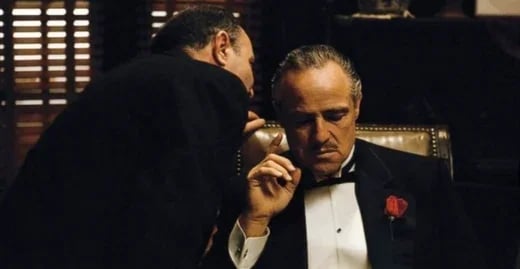
ファッション コスチュームショー
ウェディングドレスから複数のコーディネートへ次々に切り替わるファッション動画を作成します。
ステッププロセス
ファッション コスチュームショー動画生成のプロンプト例
"Help me quickly change the outfit of this bride in a wedding dress, from the style in the picture to a professional outfit, then to a mecha outfit, and finally to a swimsuit. The camera rotates 360 degrees and slowly zooms out; the girl's eyes follow the camera."
...クリックしてプロンプト全文を表示

ViNano のほかの AI 動画モデル
Seedance 2.0 Mini と Seedance 2.0 の違いは?
入力も機能も同じです。Mini は価格が安く、解像度は 720p までです。フル版の Seedance 2.0 は 1080p にも対応しています。
Seedance 2.0 Mini 動画生成ツール Wan 3.0 動画生成ツール · Alibaba
- Wan 3.0 Prime 動画生成ツール · Alibaba
 Kling 3.0 動画生成ツール · Kuaishou
- Kling 3.0 Turbo 動画生成ツール · Kuaishou
 MiniMax H3 Max 動画生成ツール · MiniMax
 Gemini Omni Flash 動画生成ツール · Google
- Seedance 2.0 Mini 動画生成ツール · ByteDance
- Seedance 2.5 動画生成ツール
- MiniMax H3 動画生成ツール
- Veo 3.1 動画生成ツール
- Grok Imagine 動画生成ツール
- Seedance 1.0 Pro 動画生成ツール
Seedance 2 は無料?よくある質問
ViNano AI での Seedance 2.0 のクレジット、制限、使い方。