
Choose Canva if…
you are already designing a resume, slide deck or social post in Canva and want the headshot inside that design, and its free credits cover what you need.
Looking for the Canva AI headshot generator? In Canva it is an app you open inside the design editor, with two free credits and then a 24-hour wait for more. ViNano's headshot tool works right on this page: upload one selfie, pick an outfit and a background, and download a studio-style headshot.
ViNano is an independent product and is not affiliated with or endorsed by Canva. Facts about Canva on this page come from its own AI Headshot Generator page, checked on November 3, 2026.
Upload a selfieDrag, paste, or
Supported types: PNG, JPEG, JPG, WEBP, HEIC, URL
Content generated on this platform is produced by artificial intelligence models and does not represent the platform's position. [Disclaimer]. [Privacy Policy].
Making a headshot needs a free account. New accounts get 50 sign-up credits with most email providers, and one Nano Banana headshot costs 25 credits on a free account, so the sign-up credits cover 2 headshots. The generate button shows the cost first.
Yes, but it lives inside Canva's design editor rather than on its own page. Here is how Canva describes it on its feature page, and where ViNano works differently.
Canva's AI headshot generator is not a separate website: you open a design, click Apps on the left, search for ProfilePhoto, upload your selfie and press Generate.
Canva asks you to choose a gender identity (female, male or non-binary) and offers a toggle that preserves your facial expression.
The app gives two free credits. Once both are used, Canva says you wait 24 hours before generating more for free, or buy extra credits from the app page.
Canva suggests Magic Edit, Magic Eraser (Pro), enlarging and Magic Expand (Pro) to touch up the result.
The ViNano AI headshot generator is a standalone tool. You pick one of four outfits and one of four backgrounds, and can add a short note such as "keep my glasses".
Headshots use Nano Banana (Gemini 2.5 Flash Image) by default, a model Google built to keep a character consistent across edits (Google Developers Blog). Always compare the result with your photo.
Canva is a general design platform with a headshot app inside it; ViNano offers a dedicated headshot tool. The table compares what each one's own pages and settings say.
| What you need | Canva | ViNano |
|---|---|---|
| Where it runs | An app inside the Canva editor (Apps, then ProfilePhoto) | A standalone tool on this page and at AI Headshot Generator |
| What you upload | A selfie | One clear photo of one person: JPG, PNG, WebP or HEIC |
| Choices before generating | Gender identity, plus a toggle to keep your facial expression | Outfit (suit, blazer, smart casual or your own) and background (studio gray, white, office or outdoor), plus an optional note |
| Free use | 2 free credits, then a 24-hour wait for more free ones; extra credits can be bought | 50 sign-up credits once; 25 credits per Nano Banana headshot on a free account |
| Headshots per run | Not stated on its feature page | 1 on a free account, up to 8 on a paid account |
| After you generate | Magic Edit, Magic Eraser (Pro), Magic Expand (Pro) and the rest of the Canva editor | Download as PNG or JPG, edit further in the AI Image Editor or animate it in AI Video |
Canva details come from its AI Headshot Generator page, checked on November 3, 2026, and may change. ViNano credit costs are read from our live settings; see pricing for credit packs and plans.
Upload one clear, recent photo of only you, facing the camera, with your face and shoulders visible.
Choose an outfit and a background. Add an optional note, such as "keep my glasses", if something must stay exactly as it is.
Generate, compare the headshot with your photo and download it as PNG or JPG. Run it again with another outfit or background to build a set.
The first image is a casual selfie; the next four are headshots ViNano generated from it with different outfit and background choices. The last three are related tools for profile and ID photos.

A casual phone selfie used as the starting photo.

Navy suit jacket and white shirt.

Navy blazer over a cream blouse.

Light blue shirt, blurred office.

Her own sweater in soft daylight.
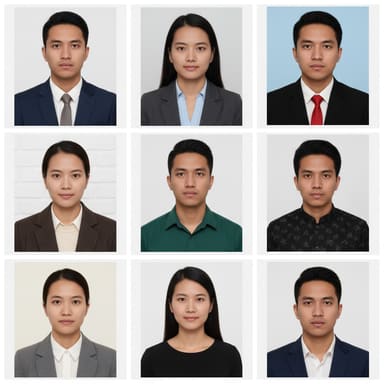
Passport-style photos on a plain background.
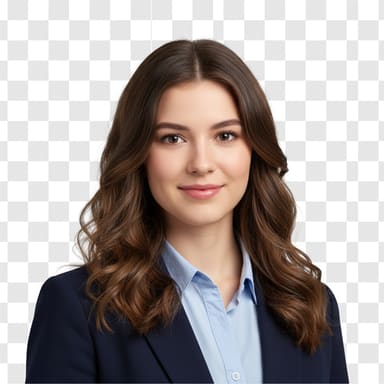
A transparent cut-out for any profile.
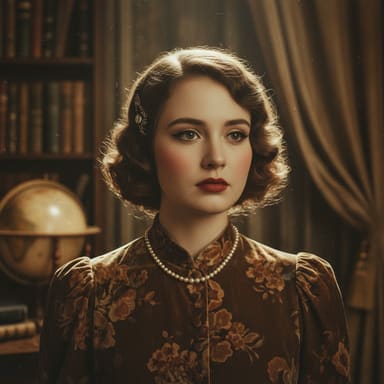
A styled portrait with new lighting and mood.
you are already designing a resume, slide deck or social post in Canva and want the headshot inside that design, and its free credits cover what you need.
you just need a professional headshot file: upload one photo, choose the outfit and background, and download it. Paid accounts can make up to 8 headshots per run.
Yes. Canva offers an AI headshot generator as an app inside its editor: click Apps, search for ProfilePhoto, upload a selfie, choose a gender identity and generate. Details are on Canva's feature page.
Canva says the app offers two free credits. Once both are used, you wait 24 hours before generating more for free, or buy extra credits from the app page (checked on November 3, 2026).
No. ViNano is an independent AI image editor and is not affiliated with or endorsed by Canva. This page compares the two for people looking for the Canva AI headshot generator.
Making a headshot needs a free account. New accounts get 50 sign-up credits with most email providers (20 with others), and one Nano Banana headshot costs 25 credits on a free account. The pricing page lists credit packs and plans.
One clear, recent photo of only you, facing the camera, in soft and even light, with your face and shoulders visible. Avoid sunglasses, hats, heavy filters, group photos and very small or blurry images.
Yes, as long as it still looks like you. Results start as a square image and download as PNG or JPG. Check the rules of the employer or platform, since some ask for an unedited photo.