

Seedance 2.0 Pro AI 影片生成器
全部影片模型(15)
Seedance 2 免費嗎?不免費。在 ViNano AI 上,Seedance 2.0 需要付費帳號(購買任一積分包或訂閱方案即可),而且要消耗積分:最短的影片是 480p、5 秒,需要 180 積分。免費帳號可以改用 Seedance 1.0 Pro。
3 步開始使用 Seedance 2.0
- 註冊 ViNano AI 帳號。使用 Gmail 或 Outlook 等常見電子郵件服務註冊的新帳號,可獲得 50 免費積分;使用其他電子郵件網域註冊,則可獲得 20 積分。免費帳號的積分可用於 Seedance 1.0 Pro,它最短的影片需要 90 積分,所以你可能需要先儲值。
- 在價格頁面購買任一積分包或訂閱方案。購買後,你的帳號就能使用 Seedance 2.0,積分也會加到你的餘額中。最短的 Seedance 2.0 影片需要 180 積分。
- 選擇 480p 和 5 秒,寫下提示詞或加入參考檔案,然後開始生成。生成按鈕會在開始前顯示確切費用,完成的影片會出現在生成器下方的紀錄中。
Seedance 2.0 免費嗎?需要多少積分
每支 Seedance 2.0 影片都會依長度和解析度消耗積分。這張表和生成器讀取的是同一份設定,所以和實際扣除的積分一致。
| 解析度 | 模型 | 5 秒 | 10 秒 | 15 秒 |
|---|---|---|---|---|
| 480p | Seedance 2.0 Fast | 180 積分 | 360 積分 | 540 積分 |
| 720p | Seedance 2.0 Fast | 400 積分 | 800 積分 | 1200 積分 |
| 1080p | Seedance 2.0 | 1600 積分 | 3200 積分 | 4800 積分 |
Seedance 2.0 只開放給付費帳號,也就是購買過積分包或生效中訂閱方案的帳號。免費帳號即使積分足夠,也無法生成 Seedance 2.0 影片,但可以使用 Seedance 1.0 Pro。
帳號完成購買後,註冊和每日簽到獎勵的積分也能用在 Seedance 2.0 上。付費帳號還能立即下載影片,不必等待免費帳號會看到的廣告倒數。
Seedance 2.0 是什麼?
Seedance 2.0 是 ByteDance Seed 推出的影片生成模型。根據它的官方模型頁面,它用單一架構同時生成音訊和影片,並接受文字、圖片、音訊和影片作為輸入。
在 ViNano AI 上,Seedance 2.0 Pro 可以生成 5 / 10 / 15 秒、480p / 720p / 1080p 的影片,並附帶同步音訊。你可以只寫提示詞,也可以加入最多 12 個參考檔案(最多 9 張圖片、3 段影片和 3 段音訊),並在提示詞中用 @ 指定它們,例如「依照 @1 的動作」。
Seedance 2.0、Seedance 1.0 Pro 與 Seedance 2.5 比較
三個 Seedance 版本都在同一個生成器中使用。下表比較了它們在 ViNano AI 上各自提供的功能。
| 版本 | 影片長度 | 解析度 | 音訊 | 最低費用 |
|---|---|---|---|---|
| Seedance 1.0 Pro | 5 / 10 秒 | 480p, 720p, 1080p | 無 | 90 積分起 |
| Seedance 2.0 Pro | 5 / 10 / 15 秒 | 480p, 720p, 1080p | 有 | 180 積分起 |
| Seedance 2.5 | 5 / 10 / 15 秒 | 480p, 720p, 1080p | 有 | 390 積分起 |
Seedance 1.0 Pro 是用無聲影片測試點子成本最低的方式,也是三者中唯一免費帳號可以使用的版本。Seedance 2.5 同樣支援音訊和混合參考,每支影片的價格較高,還能重新編輯現有影片。想看並排的實際結果,請閱讀 Seedance 1.0、1.5 與 2.0 比較。
讓 Seedance 2.0 積分更划算的技巧
- 先用 5 秒、480p 這個成本最低的設定測試新提示詞,再輸出更長或更清晰的版本。
- 描述一個主要主體、它在做什麼、在哪裡發生,以及鏡頭如何移動,例如「一名單車騎士在下雨的夜晚騎過街道,跟拍鏡頭」。
- 角色數量盡量少;人物多的場景,比較難在每一幀之間保持一致。
- 使用清晰、光線充足的參考檔案,並用 @ 指定每個檔案,讓模型知道你指的是哪一個。
- 動作看起來對了之後,再以 720p 或 1080p,或更長的長度重新生成。
Seedance 系列指南更詳細地說明了每個設定,Veo 3.1 與 Seedance 電商影片比較則比較了這兩個模型在產品短片上的表現。
在 ViNano 上用 Seedance 2.0 Pro 生成的影片
這兩段 5 秒影片是我們 2026 年 11 月 18 日在 ViNano 上用 Seedance 2.0 Pro、720p 生成的,各一次生成,自帶聲音,沒有後製剪輯。我們還生成了第三段麵包店場景,因為黑板上把我們的名字拼錯了,所以沒有放上來。展開提示詞可以看到我們原樣輸入的內容,也可以一鍵填進上方的生成框。
日落時頂樓上的舞者
Seedance 2.0 Pro · 720p · 5 秒 · 含聲音
她旋轉時紅色洋裝隨之飛揚,接著鏡頭拉遠,帶出黃昏時的城市和欄杆上橘色的 ViNano 布條。我們要求的是環繞運鏡,模型卻改成了緩慢拉遠。
查看提示詞
A dancer in a flowing red dress spins on a rooftop at sunset, the city skyline glowing behind her. An orange banner printed with "ViNano" flutters in the wind on the railing. Smooth orbiting camera, soft music.
白色懸崖外的帆船
Seedance 2.0 Pro · 720p · 5 秒 · 含聲音
空拍鏡頭飛過藍綠色的海水,逐漸靠近帆船;到結尾時,船帆上的 ViNano 名字已經清楚可讀。
查看提示詞
Aerial drone shot over a turquoise sea and white cliffs, slowly approaching a sailboat whose white sail is printed with "ViNano". Bright sunlight, the sound of wind and waves.
精選案例展示
在 ViNano AI 先生成或編輯參考圖,再用 Veo 3.1、Seedance 等模型將畫面轉為動態影片。


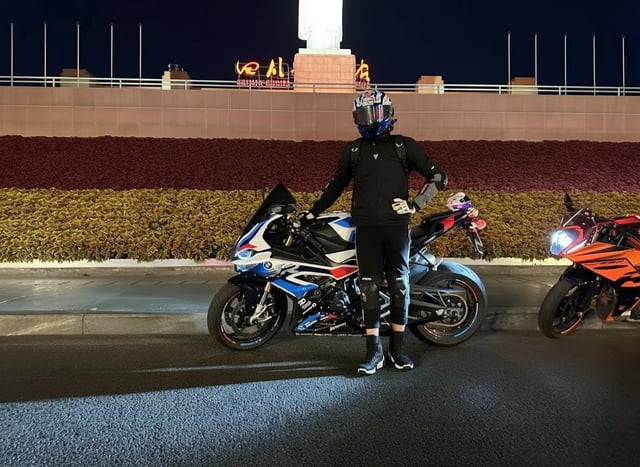
酷炫車輛姿態
將日常車輛照片改造成騎士造型圖,再生成機車雨夜疾馳的動態畫面。
步驟流程
生成酷炫姿態圖片的提示詞案例
"Change the person in the photo to get out of the car, stand next to the car, and pose in a cool way"
生成機車雨中疾馳影片的提示詞案例
"Use the motorcycle and rider in the picture to generate a photo of riding fast in the rain. In the lens, you can see raindrops falling, passing through a puddle, splashing a little water towards the lens, and then the lens immediately switches to capture the back of the motorcycle."
...點擊查看完整提示詞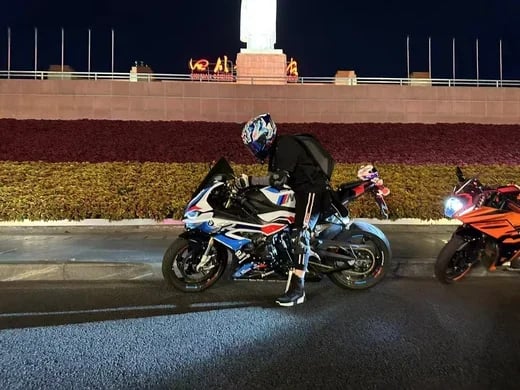


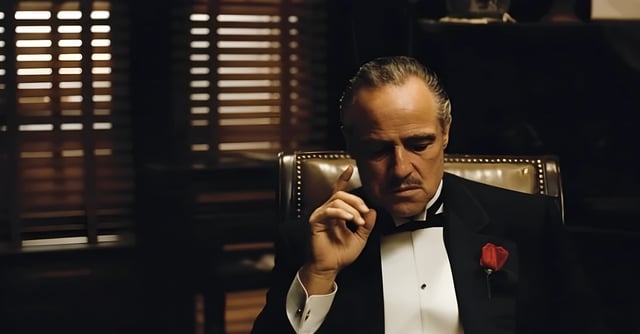
科幻戰士變身
從商務正裝人像過渡到科幻機甲造型,展示裝甲貼合與光效切換。
步驟流程
生成科幻戰士變身影片的提示詞案例
"A cinematic 8-second video in a dark, dramatic office with Venetian blinds casting striped shadows across the room. Scene begins with the man on the left, who was leaning in to whisper, slowly standing upright and walking away into the shadows. The camera tracks smoothly, keeping the central figure in focus. The central man, seated in a leather chair, lowers his hand, then rises slowly with authority. As he stands, his elegant black tuxedo instantly transforms into a glowing, futuristic Iron Man–style suit of armor, with metallic plates snapping into place across his body in rapid succession. The camera performs a dynamic dolly zoom, emphasizing the transformation. Once fully armored, he raises his right arm, a glowing weapon emerges, and he points it directly at the camera. The camera shifts to a close-up, the glowing barrel of the weapon filling the frame. In the final moment, a powerful energy blast fires directly into the lens, and the screen flashes white with cinematic sound design."
...點擊查看完整提示詞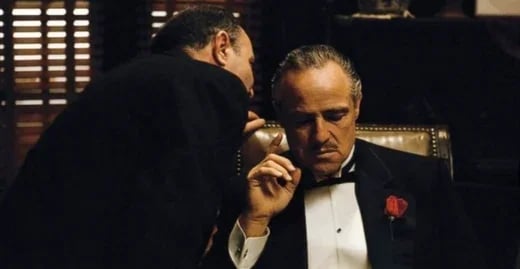
時尚變裝秀
從婚紗造型連續切換到多套日常與秀場穿搭,適合服飾變裝類短片。
步驟流程
生成時尚變裝秀影片的提示詞案例
"Help me quickly change the outfit of this bride in a wedding dress, from the style in the picture to a professional outfit, then to a mecha outfit, and finally to a swimsuit. The camera rotates 360 degrees and slowly zooms out; the girl's eyes follow the camera."
...點擊查看完整提示詞

ViNano 上的更多 AI 影片模型
Seedance 2.0 Mini 和 Seedance 2.0 有什麼差別?
兩者的輸入方式和功能都相同。Mini 比較便宜,最高只到 720p;完整版 Seedance 2.0 還提供 1080p。
Seedance 2.0 Mini 影片生成器


Seedance 2 免費嗎?常見問題
Seedance 2.0 在 ViNano AI 上的積分、限制和使用方式。